
The frustration of investing hundreds of dollars in a state-of-the-art mesh Wi-Fi system only to experience buffering during a critical video conference or lag during a high-stakes gaming session is a common grievance among modern homeowners. Many users assume that purchasing high-performance hardware is a guaranteed solution to connectivity woes, yet they often overlook the fundamental physical principles that govern wireless signals. A mesh network is not a magic fix that simply blankets a house in internet; rather, it is a sophisticated ecosystem of interconnected devices that requires careful configuration to operate at peak efficiency. When nodes are placed haphazardly, the performance drop can be staggering, leading to speeds that are a mere fraction of what the service provider delivers. To truly unlock the potential of these systems, one must pivot from a casual setup mentality to a more deliberate strategy that treats the home environment as a complex radio-frequency landscape requiring precise engineering and node distribution.
The Infrastructure of Mesh: Analyzing the Role of Backhaul Connections
Unlike traditional routers that broadcast from a single point, mesh systems utilize a primary hub and several satellite nodes to create a unified network. This architecture relies heavily on the wireless backhaul, which acts as the invisible communication link between the router and its extensions. If this backhaul is weak, the entire network suffers regardless of the internet speed coming into the house. It is vital to recognize that each node is essentially a relay station that can only redistribute the quality of the signal it receives from its neighbor. When the connection between the main unit and a satellite is compromised by distance or physical barriers, the resulting bandwidth available to end-user devices is throttled significantly. Understanding this daisy-chain effect is the first step toward optimizing a home network. By focusing on the strength of the backhaul rather than just the proximity of a phone to a node, users can ensure that the underlying infrastructure remains robust and capable of supporting high-demand tasks across the entire property.
Vitality Metrics: Distinguishing Between Throughput and Network Stability
Interference and signal decay are the primary threats to a healthy mesh backhaul, particularly in environments with numerous competing wireless signals. In high-density residential areas, the 2.4 GHz and 5 GHz bands are often saturated, leading to packet loss and increased latency that can cripple a mesh system’s internal communication. Even in isolated homes, the internal hardware must struggle against the laws of physics, as radio waves naturally lose energy as they travel through the air. A satellite node positioned too far from the primary hub will experience a high signal-to-noise ratio, meaning the hardware must work harder to distinguish the data from background static. This extra processing time manifests as lag for the user, which is often misattributed to the internet service provider rather than the internal network layout. Maintaining a clear and powerful path for these inter-node signals is essential for achieving the gigabit speeds that modern fiber connections and Wi-Fi 6E hardware are designed to provide in the current technological climate.
Strategic Placement: Implementing the Halfway Strategy
A common mistake in home networking is placing a mesh node directly inside a Wi-Fi dead zone in hopes of curing the connectivity issue there. Because the node requires a strong incoming signal to provide a fast outgoing signal, placing it in a location where the signal is already weak results in a slow and unstable connection. The most effective approach is the halfway strategy, which involves positioning the satellite node approximately midway between the primary router and the area with poor reception. This ensures that the node stays within a high-quality signal range of the hub while extending that coverage into the previously unreachable space. This configuration allows the satellite to “catch” a robust signal and relay it with minimal loss of throughput. By avoiding the temptation to hide nodes in the furthest corners of a house, users can maintain a much higher baseline speed across the entire mesh web, ensuring that even remote rooms benefit from the full capacity of the available internet service.
Architectural Navigation: Overcoming Physical Obstructions and Interference
Physical barriers such as thick walls, heavy furniture, and large kitchen appliances are the primary enemies of high-frequency wireless signals. Materials like brick, stone, and reinforced concrete are particularly effective at absorbing radio waves, while metal surfaces can reflect signals and cause destructive interference. To maintain a strong connection, nodes should be kept in open spaces and placed in areas where they have the clearest possible line of sight to the next unit in the chain. Tucking a node behind an entertainment center or inside a wooden cabinet might improve the aesthetic of a room, but it significantly degrades the performance of the network. Each obstruction that a signal must penetrate reduces its energy, leading to a cumulative loss of speed as the data moves through the house. Prioritizing open-air placement and minimizing the number of walls between nodes is a simple yet highly effective way to boost the overall efficiency of the wireless backhaul.
Vertical Signal Propagation: Optimizing Node Elevation and Coverage
Elevation plays a crucial role in signal propagation, yet it is an aspect of network setup that is frequently ignored. Wireless signals tend to travel outward and downward from the internal antennas of a router or node. Placing hardware on the floor or near the ground allows a significant portion of the signal to be absorbed by carpeting, flooring, and low-lying furniture. By elevating nodes on shelves, mantels, or high tables, users can leverage gravity and the natural radiation pattern of the antennas to cover more area with less interference. This is particularly important in multi-story homes where a node on the second floor can help provide coverage to the floor below if positioned correctly. Furthermore, elevating the hardware helps clear the “clutter zone” of a typical living space, where the highest concentration of signal-blocking objects exists. A higher placement often results in a more uniform signal distribution and fewer erratic drops in connectivity as people move throughout the building.
The Two-Room Rule: Establishing Redundancy and Seamless Roaming
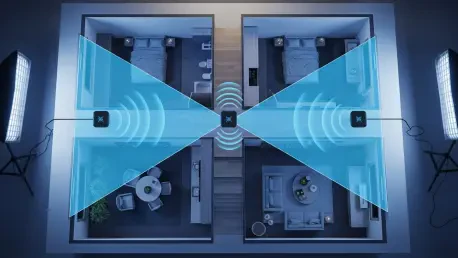
For a stable and resilient network, users should generally follow the two-room rule, which suggests that no two nodes should be separated by more than two standard walls. This spacing ensures that the signal remains strong enough to facilitate seamless roaming as devices move between the coverage areas of different nodes. When nodes are spaced correctly, their coverage areas overlap slightly, creating a redundant web of connectivity that allows for instant handoffs. This prevents the frustration of a smartphone clinging to a distant, weak signal when a stronger node is nearby. A well-designed mesh network should feel like a single, continuous source of internet rather than a collection of separate access points. Achieving this level of cohesion requires a careful balance; placing nodes too close together can cause unnecessary interference and waste hardware potential, while placing them too far apart creates “thin” spots where the connection becomes unreliable during peak usage periods.
Technological Evolution: Integrating Advanced Diagnostics and Wi-Fi 6E
Modern mesh systems are equipped with sophisticated diagnostic software that takes the guesswork out of hardware positioning. Many manufacturer apps include signal strength indicators that categorize the link quality between nodes using simple terminology or color-coded maps. For users who require more precision, third-party Wi-Fi analyzer tools can provide detailed data on signal strength measured in decibels and identify specific channels that are experiencing high levels of congestion. Utilizing these data-driven tools allows for a scientific approach to installation, enabling users to see exactly how moving a node a few feet in one direction affects the overall health of the network. This eliminates the trial-and-error process and provides immediate feedback on the impact of architectural features or interference sources. Leveraging these built-in and external resources ensures that the network is tuned to the unique characteristics of the home, providing a level of performance that matches the hardware’s theoretical maximum.
Spectrum Management: Utilizing the 6GHz Band for Seamless Connectivity
The introduction of Wi-Fi 6E has revolutionized mesh performance by opening up the 6 GHz frequency band for consumer use. This new spectrum is significantly less crowded than the traditional 2.4 GHz and 5 GHz bands, which are often congested by everything from older laptops to microwave ovens and Bluetooth devices. In a mesh configuration, the 6 GHz band can be dedicated entirely to the backhaul, providing a clear, high-speed highway for nodes to communicate with each other without interference from client devices. This dedicated lane allows for much higher data transfer rates and significantly lower latency, bringing wireless speeds closer to the performance of a wired Ethernet connection. As more devices begin to support these newer standards, the importance of managing the available spectrum becomes even more critical. Using the latest hardware standards not only improves the current user experience but also prepares the home network for the increasing bandwidth demands of future high-definition media and integrated smart systems.
Implementation History: Establishing a High-Performance Connectivity Standard
The transition toward highly optimized home networks required a fundamental shift in how users perceived wireless hardware. By moving away from the assumption that more nodes equated to better coverage, homeowners successfully reduced signal interference and increased total throughput. The implementation of the halfway strategy and the elevation of hardware units proved to be the most cost-effective methods for improving connectivity. Furthermore, the adoption of the 6 GHz band provided the necessary breathing room for backhaul traffic to flow without the congestion typical of older spectrums. Diagnostic tools allowed for the precise mapping of signal strength, which turned an invisible problem into a solvable engineering challenge. These combined efforts resulted in home environments where dead zones were effectively eliminated and wireless speeds matched the capabilities of the fiber-optic sources. Success was determined not by out-of-the-box specifications, but by the strategic precision of hardware integration.