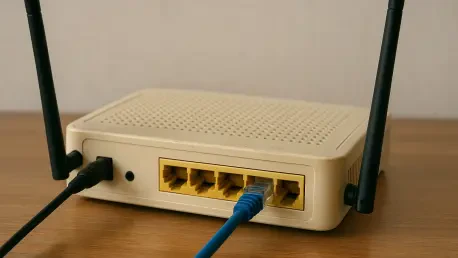

The integrated USB ports on many older routers can be leveraged to transform standard wired printers into shared resources accessible to every device on the network. This simple adaptation represents just one of the numerous ways that legacy hardware continues to provide substantial value even after being replaced by the latest Wi-Fi 7 technology. As the digital landscape evolves, the transition toward faster standards often creates a surplus of functional equipment that is frequently discarded despite its significant remaining utility. Rather than viewing an older router as an obsolete relic, modern users are increasingly recognizing these devices as compact, low-power computers capable of handling specialized networking tasks that would otherwise require the purchase of expensive new peripherals. By integrating these secondary units into the broader domestic infrastructure, households can achieve a level of customization and performance optimization that standard off-the-shelf solutions often fail to provide without extra costs or setup complexity.
Expanding Your Wireless Network Coverage
Eliminating Dead Zones: The Power of Wired Extensions
One of the most effective strategies for utilizing an old router involves reconfiguring it as a dedicated wireless access point to eliminate persistent dead zones within a residence. In the contemporary home of 2026, where dozens of smart devices compete for bandwidth, a single primary router often struggles to provide consistent coverage through dense building materials or across multiple levels. By establishing a physical Ethernet connection between the primary gateway and the secondary unit, a stable high-speed link is maintained that does not suffer from signal degradation typically associated with boosters. This wired backhaul ensures that the secondary node delivers maximum throughput to local devices, such as high-definition streaming boxes or desktop computers located in remote areas. Such a configuration effectively doubles the reach of a home network while offloading the connection management from the primary router, leading to a more resilient architecture for modern internet usage.
Wireless Bridging: Signal Expansion Without Cabling
In situations where running a physical Ethernet cable through walls or ceilings is not feasible, an old router can be utilized as a wireless bridge or repeater. This method involves the use of a Wireless Distribution System, which allows the legacy device to capture the existing signal from the primary router and rebroadcast it to a new area. While this technique can introduce some latency and reduce overall throughput—since the radio must simultaneously communicate with both the main gateway and local clients—it remains an excellent solution for low-bandwidth applications. For example, a home office or a guest bedroom that only requires basic internet access for browsing and email can benefit significantly from this expanded reach. By strategically placing the repeater at the midpoint between the primary router and the dead zone, users maximize the signal strength received and transmitted, effectively bridging the gap in coverage that would otherwise remain unserved for visitors.
Frequency Management: Optimizing Radio Resources
To achieve the best results when using a wireless bridge, one must carefully manage the radio frequencies employed by both the old and new hardware. Many older routers are limited to the 2.4GHz band, which, while slower than modern 5GHz or 6GHz standards, possesses superior wall-penetrating capabilities. By dedicating the legacy hardware to the 2.4GHz spectrum for smart home devices and low-power sensors, the primary Wi-Fi 7 router can reserve its high-frequency bands for bandwidth-intensive tasks like virtual reality or 8K video streaming. This division of labor reduces congestion on the main network and ensures that devices with different performance requirements are not competing for the same airtime. Additionally, selecting non-overlapping channels for the two routers prevents internal interference, which is a common pitfall in high-density residential areas. This thoughtful allocation of radio resources transforms an outdated piece of equipment into a specialized tool for total network efficiency.
Maximizing Infrastructure and Peripherals
Network Switching: Expanding Physical Port Capacity
As the number of high-performance devices in modern living rooms continues to grow, the standard four-port allocation on modern routers often proves inadequate for advanced users. An old router can be effectively transformed into a network switch to provide additional physical LAN ports for gaming consoles, smart televisions, and high-fidelity audio systems. By connecting one of the LAN ports on the primary router to a LAN port on the secondary unit, the legacy device acts as an extension of the existing network fabric. This configuration provides the stability and low latency of a wired connection, which is essential for competitive gaming and 4K media consumption where wireless fluctuations can lead to frustrating buffering or lag. Since the heavy lifting of internet gateway management is handled by the primary unit, the older processor in the secondary router is more than capable of managing the local switching of data packets between these high-speed peripherals without any issues.
Shared Printing: Leveraging Integrated USB Connectivity
In addition to file storage, the print server capabilities of many older routers offer a practical solution for integrating non-wireless printers into a modern ecosystem. When a standard USB printer is connected to the router, the internal software handles the print spooling and queue management, making the printer visible to any device connected to the network via Wi-Fi or Ethernet. This eliminates the need for dedicated print servers or the cumbersome process of physically connecting a laptop to the printer every time a document is needed. This functionality is especially valuable in 2026, as many users continue to utilize reliable older printers that lack native networking features but still produce high-quality output. By centralizing printer access through the repurposed router, a household can streamline its workflows and ensure that every device, from a tablet to a desktop PC, has seamless access to physical document production without the need for expensive hardware upgrades.
Local Cloud Storage: Creating Basic Network Attached Storage
The transformation of a legacy router into a basic Network Attached Storage device provides an accessible entry point for centralized data management. By connecting a high-capacity external hard drive to the router’s USB port, the device can be configured to act as a shared file server accessible by every computer and mobile device on the local network. Although the transfer speeds may not rival dedicated professional NAS systems, they are perfectly sufficient for hosting a library of household photos, shared documents, and media backups. This setup creates a local “cloud” environment that does not rely on third-party subscriptions or internet connectivity for internal data access, offering both privacy and cost-efficiency. Users can set up specific folders for different family members, allowing for organized digital storage that is centrally managed through the router’s administrative interface, further demonstrating the versatile computational nature of even older networking equipment in the modern digital age.
Strengthening Security and Software Freedom
VPN Gateways: Establishing Dedicated Privacy Nodes
Privacy-conscious users can significantly enhance their digital security by repurposing an old router as a dedicated VPN gateway for specific household traffic. Standard VPN software running on a primary router can often degrade performance for latency-critical tasks like online gaming or video conferencing due to the heavy overhead of encryption. By setting up a secondary “Privacy Wi-Fi” network on the old router, users can selectively connect devices that require anonymous browsing or geo-blocked content access while leaving the rest of the household on a high-speed, direct connection. This tiered approach offloads the processing requirements for VPN encryption to the secondary hardware, ensuring that the primary router maintains its peak performance levels. It provides a permanent, always-on security layer for devices that might not support native VPN clients, such as certain smart televisions or older streaming sticks, effectively shielding their data from prying eyes at the network level.
Custom Firmware: Unlocking Professional Networking Features
The most advanced method for revitalizing an old router is the installation of open-source firmware such as OpenWRT or DD-WRT to replace the manufacturer’s original software. This process, often referred to as “flashing,” effectively removes the artificial limitations imposed by the original vendor and unlocks the full potential of the internal hardware components. By utilizing these community-driven operating systems, users gain access to professional-grade features such as advanced traffic shaping, detailed packet inspection, and localized ad-blocking that are rarely found in consumer-grade equipment. These custom environments allow the router to act as a more versatile platform, supporting the installation of additional software packages that can transform the device into a dedicated web server or a sophisticated network monitor. While the process requires a degree of technical proficiency, it provides a level of control and transparency that is essential for power users who want to fully understand and manage their home data flows.
Strategic Next Steps for Modern Home Connectivity
The successful repurposing of networking hardware demonstrated that the lifecycle of consumer electronics could be significantly extended through strategic configuration. Users who adopted these methods found that they could achieve superior coverage and specialized functionality without contributing to the growing global problem of electronic waste. The transition to a tiered network architecture proved to be a practical solution for handling the increased device density seen in modern homes through 2026 and beyond. By focusing on the computational capabilities of legacy routers rather than their outdated wireless specs, households managed to secure their data and optimize their traffic flows effectively. These efforts paved the way for a more sustainable approach to home technology management, where the focus shifted from constant hardware replacement to continuous software-driven utility and long-term hardware resilience. These actions ensured that even as standards advanced, the core infrastructure remained robust and adaptable.